Every parent answered, before the bell.
Plus gives your school office an AI voice agent that answers every call, takes absence reports, answers the questions parents ask most and puts anything urgent straight through to staff. We set it up and look after it for you.

Parent · 7:46amHi, Amara in Year 4 won't be in today. She's got a temperature.
Plus voice agentThanks for letting us know. Can I take Amara's surname and class, and when you expect her back?
Starts fromSchool Agent
Three kinds of call, handled properly.
Most calls to a school office are absence reports, routine questions or requests to speak to someone. A few are urgent. Plus is set up to handle each one the way your school wants.
Absence reports, taken properly at 7:45am.
Absence calls tend to arrive in the same short window before registration. The agent answers every one, asks for the details your attendance policy needs and sends a consistent report to your office inbox.
- Child's name, class or form, and the reason
- Symptoms and expected return for illness
- Parent's name and a number to call back
The same questions, answered every time.
Term dates, INSET days, uniform, lunches, clubs and trips. The agent answers from the information you give us, so your office isn't repeating itself all day.
- Answers from your website and policies
- Updated by our team when your information changes
- Takes a message when a question needs a person
Anything urgent goes straight to a person.
The agent follows your escalation rules. Safeguarding concerns, emergencies and distressed callers are put straight through to the people you choose. With Pro, threat assessment also helps flag suspicious calls, such as requests to change bank details.
- Warm transfers to the office, DSL or head
- Messages for the SENCO and pastoral team
- Suspicious calls flagged with Pro
From the first absence call to after hours.
- 07:30Absence calls start
Every call is answered and each report goes to the office inbox.
- 08:45Registration
Your attendance team works from consistent reports, not scribbled notes.
- 10:30During lessons
Parents get answers without anyone pulling a teacher out of class.
- 15:15Home time
Collection changes and messages reach the right class quickly.
- 18:00After hours
Calls are still answered, with messages waiting for the morning.
The numbers behind the morning rush.
of parent queries to school offices arrived by phone in a DfES study of ten schools, and 7:30 to 9:00am was the busiest time.
DfES research report RR575of pupils in England have a first language known or believed to be other than English (January 2026).
DfE, Schools, pupils and their characteristicsSchools are expected to contact parents on the first day of absence when no reason has been given.
DfE, Working together to improve school attendanceFully managed, from day one.
We train the agent on your school, test it with you and keep it up to date. Your office simply gets fewer interruptions.
- Answers 24/7Before the office opens, during lessons and after home time, on your existing number.
- 20+ languagesParents can speak the language they're most comfortable in.
- Reports to your inboxAbsence reports and messages arrive in the same format, every time.
- Warm transfersCallers who need a person are put through to the right member of staff.
- One inbox for messagesAdd website chat, WhatsApp and SMS alongside your calls.
- Transcripts & summariesEvery call written up, with sentiment and threat assessment.Pro
 Portal
Know which parent is calling before you say hello.
EdTechPro Portal connects your school's 3CX phone system to your MIS. When a parent rings, their name shows on the handset, and the moment you answer, their profile, linked children and call history appear on screen.
- Caller identification The caller's name appears on your handset and 3CX app before you answer, if they're in your MIS.
- Profile on pickup A screen pop-up shows the caller's relationship to each child and their call history.
- Safeguarding notices Court-ordered relationships and pinned notes appear as soon as the parent calls.
- CPOMS integration Calls from monitored guardians create a CPOMS incident for your safeguarding team.
- AI attendance capture Absence voicemails are imported with a suggested absence code.
- Notify staff of a call A built-in email tool fills in the caller's details, so you just add who to tell and a note.








- Caller ID on handset and 3CX app
- Screen pop-up with MIS information on answering
- Safeguarding alerts (court orders check)
- Caller history and call journaling
- Notify staff members of a call
- Everything in Portal Lite
- Log lesson or session (AM/PM) attendance in seconds from Portal
- Priority support from the EdTechPro Client Success Team
- Access to beta features
Plus answers. Portal informs.
- When the office is busyYour Plus voice agent answers, takes the absence report and sends it to your inbox.
- When your team answersPortal puts the parent's MIS record on screen straight away.
- Either wayAttendance gets logged faster, with fewer names to spell and fewer profiles to search.
Features and plans from EdTechPro. EdTechPro and Portal are products of EdTechPro Ltd. Vanilla Cloud will quote for Portal alongside your phone system.
Bells, paging and emergency alerts. Two ways to do it.
We can supply IP speakers, alerters and intercoms from Algo or Fanvil. Compare them below, then we’ll plan the layout around your site.
Algo IP endpoints for education
Algo devices offer practical tools to streamline communication, enhance safety and support emergency alerting. From broadcasting announcements and class change signals to critical notifications, Algo IP speakers provide campus-wide communication.
They integrate with third-party SIP platforms, multicast systems, relay input and APIs, so schools can modernise legacy infrastructure while keeping room to grow.
- Clear voice paging and announcements, even in noisy areas like hallways and cafeterias
- Two-way talk and ambient noise detection
- Visual alerters for emergencies, and call buttons for immediate assistance
- An embedded scheduler for bells and announcements
- Intercoms so administrators can verify who enters the building
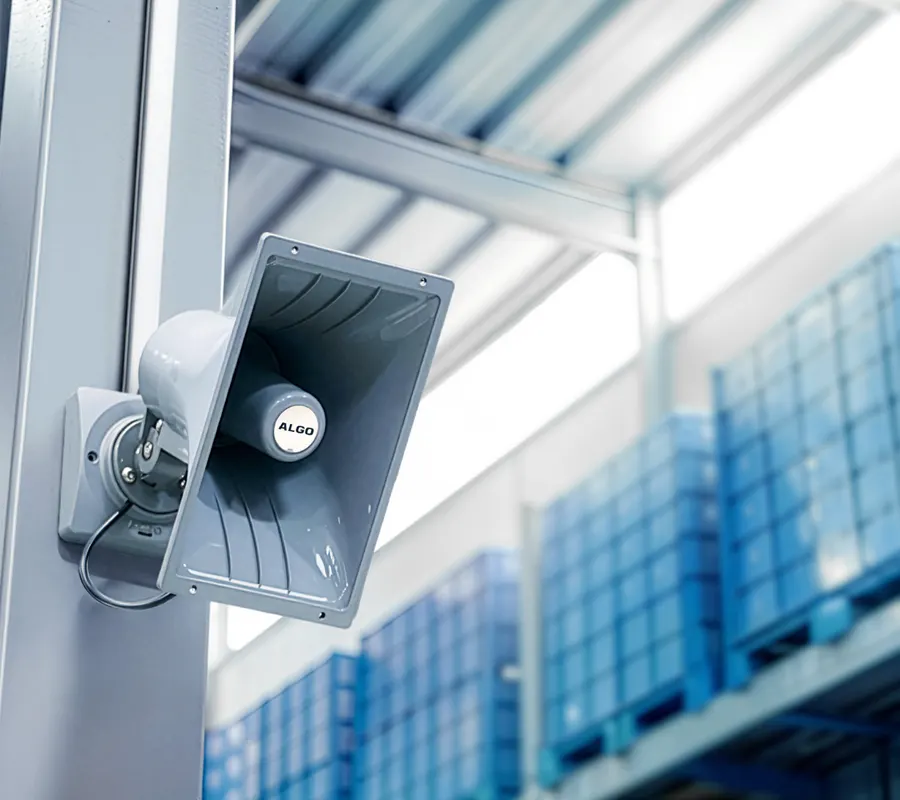
Where each Algo device goes
Algo details from the Algo brand catalogue (IP Endpoints for Education).
Fanvil education solution
Fanvil’s education solution brings together telephony, video access control, emergency intercom, public broadcasting, wireless intercom, multi-party conferencing and video surveillance.
- Intercoms and IP speakers with sound detection, scream alarms and keyword recognition
- Environmental monitoring on intercom and broadcast devices, so staff can respond by voice
- SIP and ONVIF support, to work with surveillance and communication systems
- Intercom, broadcasting, phone and surveillance alarms in one system

Where each Fanvil device goes
Fanvil details from Fanvil’s Educational Solution page (opens in a new tab).
- The Terrorism (Protection of Premises) Act 2025, known as Martyn’s Law, became law on 3 April 2025.
- The government intends an implementation period of at least 24 months. There is no requirement to comply until the act comes into force, and statutory guidance will be published during that period.
- Settings that reasonably expect 200 or more people (staff and learners) are in scope. Early years, primary, secondary and further education settings stay in the standard tier even at 800 or more. Below 200 is out of scope, but the Department for Education encourages all settings to have preparedness plans.
- In-scope settings will need, so far as is reasonably practicable, procedures for evacuation, invacuation, lockdown and communication (to alert people on the premises to the danger).
- Each setting will have a responsible person, who must notify the Security Industry Authority.
The Department for Education does not endorse any third-party products or providers. Source: GOV.UK, How Martyn’s Law will affect education settings (opens in a new tab).
Algo is a trademark of Algo Communication Products Ltd. Fanvil is a trademark of its owner.
What else Plus can add.
AI is one ingredient. We can bring in the rest of your solution too.
Schools FAQs.
Can you supply bells, paging and emergency alert equipment?
Can absences be recorded straight into our MIS?
What is EdTechPro Portal?
Will it deal with safeguarding calls?
Can parents speak to it in other languages?
Does it replace our office team?
What about data protection?
Does it work on our existing number?
Guides for school leaders.
AI phone answering for schools: easing the morning rush
Most calls to a school office arrive before registration. How an AI receptionist can take absence reports and routine questions, and where people must stay in charge.
Read article
School absence line: quicker for parents, easier for your office
What DfE attendance guidance expects, the details to capture on every absence call, and how to stop the 8am phone queue.
Read articleHear it take an absence call.
We'll show you an agent answering the calls your office gets, trained on your school's information.